.avif)
How to Add Team Members to Your Store Locator

A well-maintained store locator not only helps customers find your locations but also lets you showcase your team. With MapCosmos, adding team members is simple, whether you manage a single location or a large network.
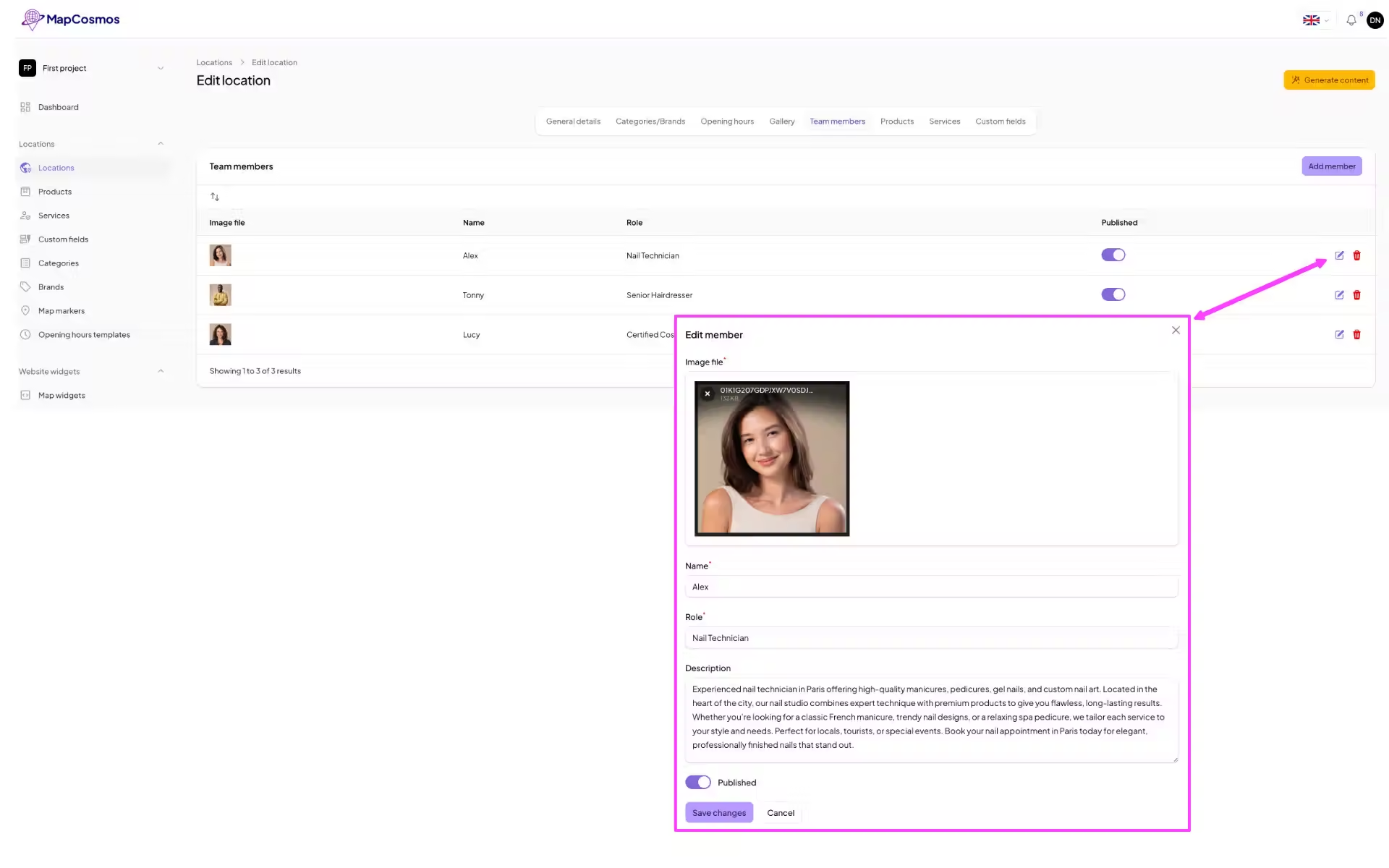
Step 1: Manual Entry of Team Members
- Log in to your MapCosmos panel.
- Navigate to the Locations ---> Team Members tab.
- Click Add Team Member.
- Upload a photo of the team member.
- Write a description, including their specialization and role.
- Add contact details for direct customer communication.
Manual entry is perfect for smaller teams or when you want customized profiles.
Step 2: CSV Import for Large Teams
For multiple locations or large teams, CSV import is faster:
- Download the CSV template from your MapCosmos panel.
- Fill in each team member’s data:
- Name
- Photo URL
- Specialization/role
- Contact information
- Upload the completed CSV back to MapCosmos.
This ensures consistency and saves time when managing many staff profiles.
👉 Read more: [How to import data efficiently in MapCosmos]
Why Adding Team Members Improves Local SEO
- Boost Visibility: Each profile can include keywords and location information, improving your local search rankings.
- Build Trust: Customers see the real people behind your brand.
- Showcase Expertise: Highlight each team member’s skills and specialties to attract the right clients.
Tips for Optimizing Team Member Profiles
- Use high-quality photos for each member.
- Include role-specific keywords in descriptions.
- Keep contact information accurate and up-to-date.
- Link team members to relevant service pages to improve SEO.
Adding team members to your store locator in MapCosmos is quick, flexible, and essential for enhancing local SEO and customer engagement. Whether you use manual entry or CSV import, you can easily showcase your team, improve search visibility, and make it easier for customers to find and connect with the right person.
Ready to drive real results
See how MapCosmos transforms browsers into customers with a live walkthrough.