.avif)
Secure Access to Your Fully Customized Store Locator with Two-Factor Authentication

If your business has one or more physical locations, a fully customized store locator with dedicated location pages is a must-have. But while helping customers find your stores is important, so is keeping your store data safe.
That’s why we’ve added powerful security features to protect your store locator panel - including two-factor authentication (2FA).
Why Security Matters for Businesses with Multiple Locations
When you use a custom store locator, you're managing more than just addresses. Your panel might include:
- Store hours and contact details
- Geo-coordinates for each location
- SEO settings for dedicated location pages
- Local promotions and seasonal updates
- Staff access and user permissions
This data helps customers find the right store near them - especially when they search by city, zip code, or region. But if someone gets unauthorized access, they could change or remove this critical info.
That’s why our store locator platform includes built-in security with two-factor authentication.
Two Ways to Log in Securely
You can choose between two simple and secure 2FA methods:
Option 1: Email Verification Code
After entering your password, we’ll send a unique 6-digit code to your email. Enter it to complete your login.
- No apps needed
- Easy for solo business owners or small teams
- Works on desktop and mobile
Option 2: Authenticator App (Google or Microsoft)
Prefer extra security? Use an authenticator app like:
- Google Authenticator
- Microsoft Authenticator
After setup, you’ll get a new secure code every 30 seconds - even without internet access.
- Strong protection against hackers
- Ideal for multi-location businesses or franchises
- Recommended for admin-level users
Quick Setup, Lasting Protection
It only takes a minute to enable two-factor authentication in your store locator dashboard. Choose your method once, and it’ll protect all future logins.
How to Set Up Two-Factor Authentication
Getting started is easy. Just follow these steps:
- Log in to your MapCosmos Store Locator Panel
- Go to your profile settings
- Choose your preferred 2FA method:
- Email verification code, or
- Authenticator app (Google or Microsoft)
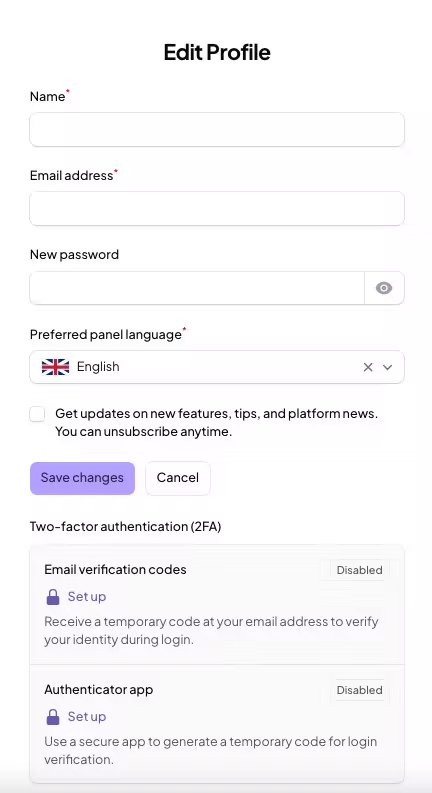
That’s it, your store locator panel is now protected with two-factor authentication.
You can also switch methods or update your settings anytime.
Why This Matters for Local SEO and Customer Trust
Having a secure, fully customized store locator with dedicated geo-specific pages helps your business show up in local search results. But it also shows customers that you take your business and their experience seriously.
- Search engines like Google prioritize secure websites and tools
- Accurate location data builds customer trust
- Protected access prevents unauthorized edits or errors
In Short: Your Locations Are Valuable - Protect Them
Whether you're a small shop with one address or a national chain with hundreds, your store data is valuable. With two-factor authentication, you control who can access and edit it.
✅ Secure login
✅ Easy setup
✅ Works for every business with one or more locations
Ready to protect your store locator panel?
Log in now and activate 2FA, or reach out to our support team for help.
Ready to drive real results
See how MapCosmos transforms browsers into customers with a live walkthrough.