.avif)

+
Transform Your Carrd Site with a MapCosmos Store Locator
Step 1: Craft Your Interactive Map Experience
The first phase of this transformation happens in your MapCosmos dashboard, where you'll build the map that your visitors will use. This process is designed to be quick and intuitive.
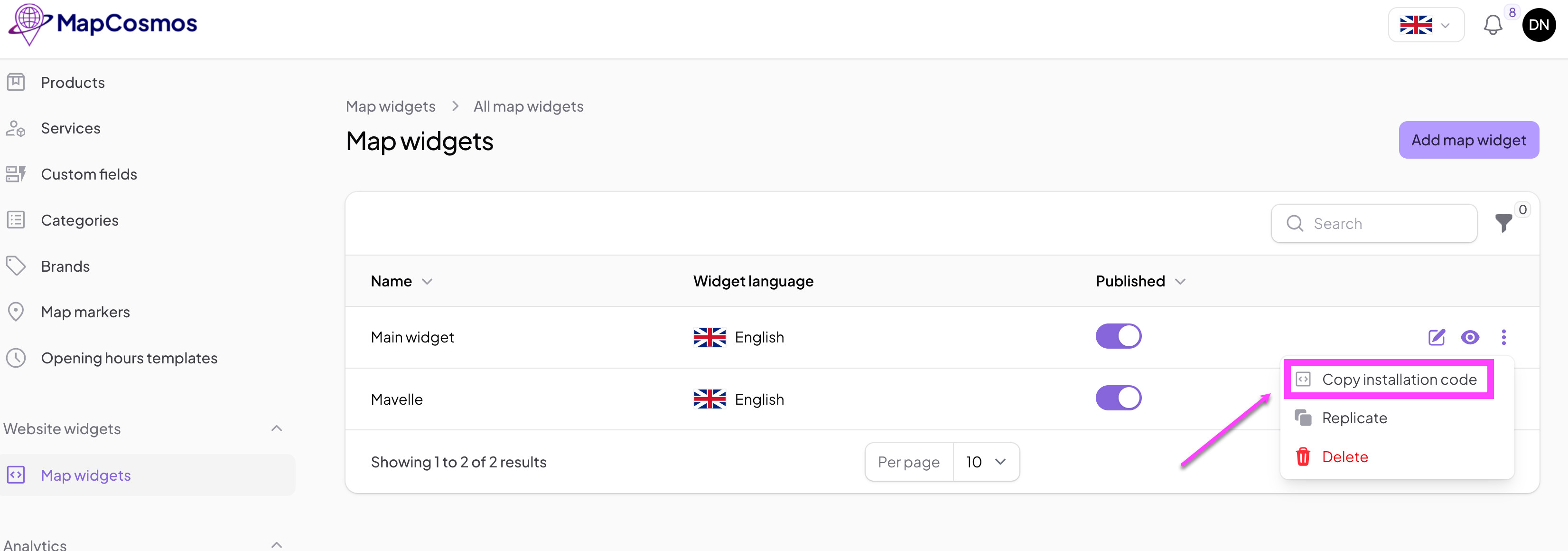
For a complete walkthrough of this setup, please refer to our detailed guide on generating the installation code.
Copy the installation code to clipboard:
Step 2: Add MapCosmos Widget on Carrd
Integrating your new map into your Carrd site takes only a few clicks. Carrd's "Embed" element is built for exactly this purpose.
- Open your Carrd site in the editor.
- Click the plus (+) icon to add a new element.
- Select the Embed element from the list.
- Set the Type to Code.
- In the Code field, paste the installation code you copied from MapCosmos.
- Click Done and publish your site.
That’s it – now your customized MapCosmos widget is visible on your Carrd page.